
What AI should I get for law school? 2026 edition
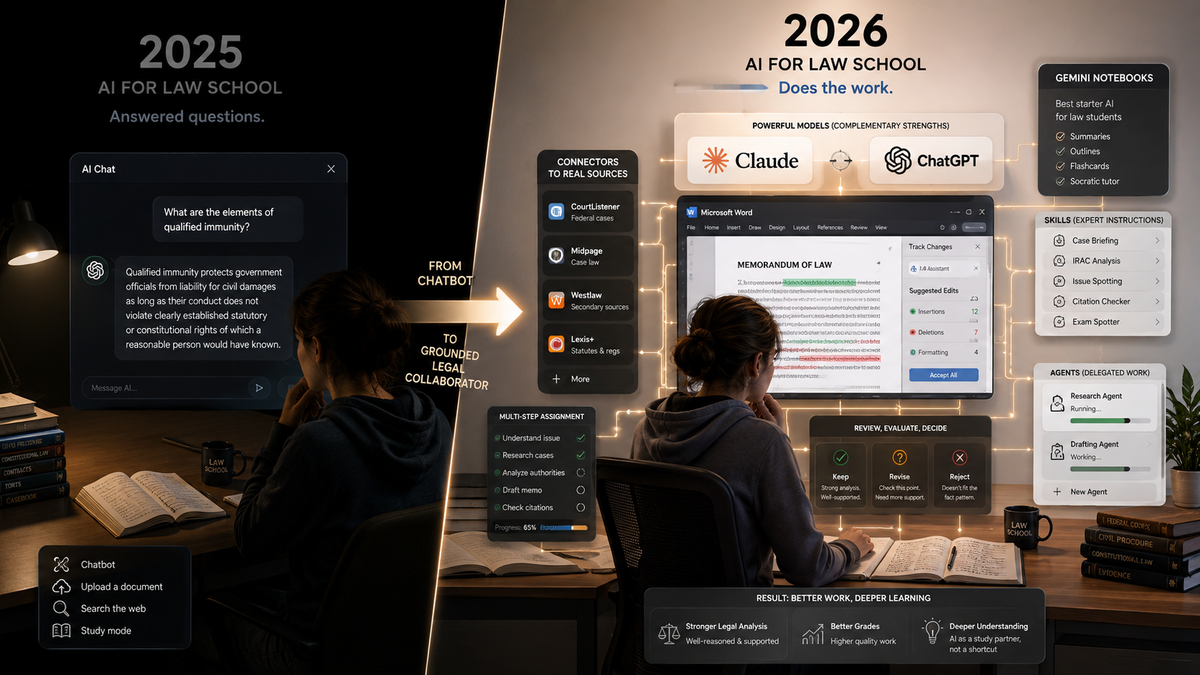
Get paid subscriptions to Claude and ChatGPT, grab every free subscription your school offers, and then spend your energy where it now matters most — learning to work the harness of connectors, skills, and agents that turns a good model into a serious legal tool.
Executive Summary
A year ago I answered this question with ChatGPT and Gemini, and I told most of you to skip Claude. That advice is now totally wrong, which both motivates this post and tells you something about how fast this field moves. Here is the 2026 answer, compressed.
Get two paid subscriptions: Claude and ChatGPT, at roughly $20 per month each. Both are now outstanding, and they are outstanding in ways that complement each other. If your school hands out free subscriptions to anything — Gemini is the most common — take them. Gemini Notebooks (the tool formerly known as NotebookLM) remains the single best starter AI for a law student, even though Gemini’s underlying models have slipped off the frontier. If money is tight, Grok 4.5 is now decent, and Meta’s Muse Spark 1.1— a real improvement on the older Meta model I once told students to avoid at all costs — has clawed its way to respectability. The technically minded should look at OpenRouter, which opens the door to dozens of models, including cheap ones like GPT-5.6 Luna and the strong Chinese models, though the latter come with confidentiality worries you should take seriously.
And the deepest point: the choice of model vendornow matters less than your competence with the machinery around it. Grounding, connectors, skills, agents, surfaces. A baseline good model plus fluency with the harness beats a frontier model used as a chat toy. Every time.
Two further questions get answers below. Will AI rot your brain? Not if you use it as a complement to thinking rather than a substitute for it — and this blog will show you what the difference looks like in practice. What about your school’s AI policies and your professors’ AI advice? Follow the policies, even the dumb and dumber ones. As far the advice goes, weigh it critically — with attention to whose interests it serves.
What a difference a year makes
When I wrote the 2025 edition of this post, the state of the art was a chatbot with accessories. You typed a question, the model searched the web, and if you were sophisticated you used Deep Research mode or built a CustomGPT. Agent Mode had just appeared and was as much promise as consumerized product. I graded the models like a curve-conscious professor: ChatGPT and Gemini at the top, Claude a specialist’s tool, Grok a year behind, Meta’s offering — let me quote myself — “for anything serious, it stinks.”
Almost none of that describes the world entering the 2026-27 academic year. The models got better, yes. Indeed, "yes!" with an exclamation point! But the models were the smaller part of the story. The most important change is the harness — the apparatus surrounding the model that lets it read real case law, run code, operate your computer, edit your documents in place, and follow packaged expert instructions. In June of this year I watched Claude, wired to free research connectors, go toe-to-toe with CoCounsel — Westlaw’s flagship legal AI — on a hard federal-jurisdiction problem and win, at about one percent of the cost of equivalent associate time. In July of this year, I used a multi-tool pipeline to produce a respectable, publishable case comment on a two-week-old Supreme Court decision in about two days. Neither of those was possible on any consumer subscription a year ago. Both are now available to a 1L for the price of two streaming services.
Run the comparison feature by feature and the year looks even steeper. In August 2025, “AI for law school” meant asking questions and getting answers, plus a study mode and some document upload. In August 2026 it means an AI that sits inside Microsoft Word making tracked-change edits to your memo; an AI that queries CourtListener, Midpage and other connectors directly and returns cases or other sources that exist; an AI that follows packaged expert instructions — skills — for briefing, drilling, and citation-checking; and an AI you can hand a goal in the morning and evaluate in the afternoon. It means distribution systems like Lawve.ai for skills and acknowledgement by at least Claude that the legal market is a major arena for large language models to add value. The models improved on the usual benchmarks, and the new harness is part of what made the improvement matter. Last year’s post debated which chatbot answered best. This year’s tools are not merely chatbots, they are much more like colleagues to whom you delegate work.
Another difference for 2026 is the length of time it takes for AI to respond. Frontier models are likely to seem slower. That's because all the reasoning we tried to coax out of them by various prompting strategies — "think step by step" — is now handled automatically, and it turns out that in law, reasoning takes a lot of words. Waiting half an hour for a response to a question may indeed seem annoying at times, but it is a tribute to the depth of reasoning in which large language models can now engage.
If you want quick answers to questions for which you do not expect extensive rumination, start up tasks that use a model like Sonnet or Luna or Gemini Flash-lite.
So the question “what AI should I get?” has quietly become two questions. Which subscriptions to buy — that one is easy this year. And how to build the competence that makes the subscriptions worth buying. That's not so easy and perhaps becoming more challenging as the options and capabilities expand.
Get Claude
The biggest change from last year’s advice: Claude moves from “only if you code” to the top of the list. Three developments did it.
The first is Claude for Word, which by itself justifies the subscription price. Lawyers live in Word, and law students will too. The add-in puts Claude inside the document: it reads your draft, comments on it, reads the comments others left, and applies edits as tracked changes you accept or reject one at a time. No copying text into a chat window, no pasting it back, no wrecked formatting. I’m using it right now to edit this blog post. When I ran a real summary judgment motion through it, Claude summarized the argument, generated a judicial first impression, flagged weaknesses, researched the case law — and caught a fabricated quotation attributed to a real New York case. For a law student writing memos, briefs, and seminar papers, this is the difference between an AI you consult and an AI that works beside you. There are a few things that you can't do within Claude for Word that you can do using other surfaces, but not many that often matter.
The second is Claude for Legal: a set of legal plugins and connectors that includes a Law Student plugin (Socratic drilling, case briefing, IRAC feedback, exam forecasting) and a free CourtListener connector that gives you actual legal research — real cases, real citations, negative-treatment checks — without a Westlaw or Lexis password. You will likely get Westlaw and Lexis through school. But an AI that can pull and read the cases itself, rather than hallucinating them, changes what every other feature is worth. And the whole apparatus is customizable: you can stack plugins, add skills, and wire in connectors until Claude stops being a chatbot and starts being a configured legal research environment. I, for example, have connectors to CourtListener, Descrybe, Midpage, Diggduff, Legal Data Hunter, Consensus and more.
The third is agentic capability, about which more below. Claude’s Cowork product gives the model a computer of its own — and, if you let it, access to yours. And not just a computer but also the technical expertise to program it to undertake a multitude of tasks. That might sound alarming, and you should think before granting access. But it is also the architecture behind some of the most impressive things I have done with AI this year: grounded slide decks, problem sets, and study materials produced from a single instruction.
Get ChatGPT too
For a stretch of late 2025 and early 2026, Claude ran ahead of the field for legal work, and I wondered whether the two-subscription advice would survive. Then ChatGPT came back. With a vengeance. The GPT-5.6 family is fast, cheaper than Claude when used via API, markedly less prone to hallucination than its predecessors, and wired into its own set of legal research connectors, including Midpage and Descrybe. ChatGPT Work matches much of what Cowork does and in some instances such as website building surpasses it. The Codex app turns ChatGPT into a tireless conversational drafting partner — I used it as the front end for the case comment mentioned above, on the principle of talk first, draft second: argue with the model about the case until the thesis is sharp, and only then let anything get drafted.
ChatGPT also keeps its old strengths, which mattered in the 2025 edition and still do. Study and Learn mode remains a strong Socratic tutor although now you access it via @study rather than through a menu command. CustomGPTs are still a simple way to create repeatable workflows such as letting you bundle your course materials with standing instructions. They are kind of a first generation "skill" that still has value. Voice mode is the best way to review doctrine while walking to class. And image generation has gotten good enough that I have used it to teach law with AI-generated comic books — a sentence I could not have typed with a straight face two years ago. Its Sites function, which builds a working website out of a description and other materials, is also both better and easier to use than Claude’s equivalent; if you need a site for a student organization, a journal, an area of law, or a clinic project, that is the faster road.
Why both?
The same reason as last year, now stronger. Two AIs with different training and different temperaments catch each other’s mistakes. Have Claude draft and ChatGPT attack, or the reverse. Feed one model’s answer to the other with instructions to critique it ruthlessly. The models are good enough now that their disagreements are usually informative — where they diverge is often exactly where the legal question is hard. A single model, however strong, gives you tunnel vision with a confident voice. Moreover, some things that are difficult in ChatGPT are easier in Claude. And the reverse.
What if you truly cannot afford two for a school year? Then afford them for a month. Buy both, run your real work through both for thirty days, and keep the one you find yourself reaching for. Which one that turns out to be is a matter of taste, temperament, and the kind of work you actually do. I cannot decide it for you, and you should be suspicious of anyone who says they can.
Use Voice
Voice deserves more than the half-sentence I gave it above, because it changed in July. GPT-Live replaced Advanced Voice Mode as ChatGPT’s default, and the change is significant: the old mode was half-duplex, waiting for you to stop talking before it answered, which produced that stilted walkie-talkie rhythm. GPT-Live listens and speaks at the same time. It stays quiet while you think, drops in an “mhmm” to show it is following, and lets you talk over it without losing the thread. Paid tiers get the full model; free accounts get the mini version. All of this makes sustained discussions possible while you walk, drive, or cook. And, frankly, it also lets you practice your oral skills, an area that is still important in the practice of law. I have watched younger students make voice their primary interface, talking through a case or other project until the analysis is sharp. Try it on the commute: explain the holding of a case you half-understand and let the model interrogate you. Claude’s voice mode, by contrast, is the weaker product right now; if voice is going to be your primary interface, ChatGPT is your friend.
If you like voice, consider local speech-to-text models such as NVIDIA's open-weight Parakeet family, which run entirely on your own machine, punctuate as they go, and never send your audio anywhere. That makes them the right tool for dictating a memo or a clinic note that should not touch a third-party server.
Take the free stuff – especially Gemini Notebooks
Before you spend a dollar, however, find out what your school already provides. Many universities now carry institutional subscriptions — Gemini is the most common, and some schools are negotiating enterprise frontier-model licenses for other models for every student, an approach Dean Bobby Chesney’s AI memo at Texas — the most serious institutional document yet written on this subject — commits to explicitly. If your school offers a free subscription to anything competent, take it. The price is right.
If that free subscription is Gemini, use it, and start with Gemini Notebooks — the product formerly known as NotebookLM. It remains what I called it last year: the best single AI tool for a law student starting out, and worth the price of admission by itself when that price is zero. Load a notebook with your casebook excerpts, class notes, and outlines, and it will answer questions grounded in your materials — with citations to them — rather than the open internet’s confident guesses. Then it will manufacture study aids from those materials: flashcards, quizzes, study guides, slide decks, audio discussions, even video overviews. And Gemini Notebooks now integrates properly with Gemini itself, so the wall between your notebook and the general-purpose model has mostly come down. By using Gemini's "Canvas" feature, you can even build a website out of materials in a Notebook. I have gone further and wired Claude to it programmatically, turning Gemini Notebooks into what I described as a factory for the production of high-quality learning materials. And I've shown how a student who records her classes can now turn raw transcripts into a full study suite — flashcards, audio debates, slide decks — in an afternoon.
There's a caveat. Gemini’s underlying models have fallen behind. Decent, but no longer at the frontier. A year ago I ranked Gemini alongside ChatGPT at the top; today I cannot. Google has surprised before and may very well again — but as of August 2026, Gemini should be the free supplement for the law student with limited resources, not the paid core.
The rest of the field
Sometimes, even with paid plans, you may want to flirt with other language models. You might be approaching your usage limits on an existing subscription. Your paid models might be occupied performing other tasks. Or you might just want to explore. There are now several decent options. The first is Grok 4.5 from xAI. It's a strong model. Not quite at the level of the top models from Anthropic and OpenAI, but close. You get limited access to this model with the free version of Grok. There's also Perplexity. It is a retrieval-first AI: every answer is built from live, cited sources, with model choice across vendors and licensed premium data. It's sometimes better for current-events lookup and market research but worse at reasoning over your own documents, sustained drafting, and polished deliverables. There's also a $9 per month version of Perplexity for .edu email address holders that gets you access to a variety of strong models (although not Claude Fable, not ChatGPT 5.6 Sol) and that enables certain forms of agentic behavior. Perplexigty may have some use cases and for the student who wants a paid plan but for whom the lower monthly price matters, it's worth exploring. For what it's worth, in writing this article, I realized that I have one of those $9 per month plans and that I should probably shut it down because I don't use it.
Meta’s Muse Spark deserves its own paragraph, because last year I told students to stay far, far away from Meta’s then-current model, and I meant it. Muse Spark is a different animal, and it is now at least decent. I would not build a legal workflow on it, particularly since it does not know how to use skills or connectors, and I don't believe this Facebook cousin provides confidentiality. But at least I no longer treat Meta’s AI as a hazard. What it is good for is the simplest questions, asked freely — there are no usage limits to ration, and it will not embarrass itself on well-plowed ground. Ask it what Marbury v. Madison was about and you will get a serviceable answer. Ask it about a recent Fifth Circuit decision on general average in maritime law and you will not.
Notice the pattern in those two paragraphs, because it is the real headline of 2026: all the major models are now pretty good. The floor has risen so far that the old ranking exercise — this model brilliant, that one useless — has lost most of its point. What separates outcomes now is not which model you picked but what you do with it.
For the technically minded, a few further notes. OpenRouter gives you metered access to an enormous range of models through one account — pay per use, no subscription, switch models per task. Through it (or through OpenAI’s own API) the budget-tier GPT-5.6 Luna is startlingly cheap — at a dollar per million input tokens, a heavy month of student use may cost less than a subscription. The best Chinese models — DeepSeek, Kimi, GLM and their successors — are strong and often cheaper still, and if your school’s policies or your state’s laws allow them, they are worth exploring. But be extra wary about confidentiality. Do not put anything into a Chinese-hosted model that you would not be comfortable seeing leave your control — no clinic client information, ever, and think hard even about your own draft work. That is not a boycott; it is the same data-hygiene reflex your professional responsibility course will try to build in you, arriving a year early.
And local models — the ones that run entirely on your own laptop through programs like Ollama or LM Studio, with perfect confidentiality and no subscription at all? Sadly, not quite there yet for legal work. When I ran a genuine Texas insurance question through a strong local model this summer, the answer was fluent, confident, and doctrinally wrong. Play with them; they are instructive and occasionally astonishing. The picture is moving, though: LM Studio Bionic, released just last week, wires certain connectors into a local model or a cloud variant so its answers can be grounded, and may support skills as well. What it has not answered is what happens to the materials you submit — the confidentiality story is still unclear, which is precisely the thing a local model is supposed to guarantee. So treat it as a laboratory rather than a workspace: run practice questions through it, watch how a local model behaves with connectors attached, and keep real client matters out of it. Local models remain hobbyist and expert territory this year. I am hoping my 2027 advice reads differently.
The model matters less than the harness
Now the part of this post I most want entering students to absorb, because it is what a year of hands-on work has taught me. In 2025, choosing an AI was mostly choosing a model. In 2026, the model is table stakes. The competence that separates students who get astonishing results from students who get mush is competence with the harness — the machinery that surrounds the model. Three pieces of it matter most.
Grounding and connectors. A raw language model answering a legal question is working from compressed memory, and compressed memory hallucinates. A model wired to a research connector — CourtListener, Midpage, Descrybe, or even the brand new Dingduff — pulls the actual cases, reads them, quotes them, and checks whether they are still good law. The difference in output quality is not incremental; it is the difference between a B- answer with two invented citations and an A memo a partner would sign. Learning to attach connectors and to demand grounded answers is the single highest-value AI skill a law student can build this year. Grounding is part of what made Gemini Notebooks so popular. This year, easy grounding migrates over to other workflows.
Skills. A skill, in current AI parlance, is a packaged file of expert instructions the model loads when a task calls for it — a checklist, a method, a standard of quality, written once and reused forever. There are skills for briefing cases, for stress-testing a draft against opposing counsel, for scrubbing AI tics out of prose, for building bar-exam questions. I've written many. And you can write your own in plain English: describe how you want a recurring task done, well, once. You can also find and install skills others have built, on marketplaces such as Lawve, which has grown into a working catalogue of legal skills — delegation audits, citation checkers, charter builders — published by practicing lawyers and academics. English really is the new programming language here, and skills are its subroutines.
Agents. Agentic AI is the label for the third piece, and it is less mysterious than the buzz suggests. Yes, I know I am oversimplifying, but think of an agentic AI as an AI that happens to own a computer — quite possibly your computer — plus an immense knowledge of programming and permission to act in steps toward a goal. Instead of answering one question, it plans: search for the cases, read them, draft the memo, check the citations, format the document, report back. Claude’s Cowork and ChatGPT’s Work products are consumerized versions of agentic AI. When people ask how I produced a grounded twenty-slide presentation, or a full problem set, or a case comment in two days, the answer is always some version of: I gave an agent a goal, a set of connectors, and a set of skills, and I reviewed what came back. This blog is, at this point, largely dedicated to teaching that craft.
Put the three together and the formula for 2026 is short: a baseline good model, plus grounding, plus skills, plus agents, plus your judgment about what to keep. That combination lets a law student do things that were partner-and-a-team work two years ago. The model at the center can be Claude or GPT or several others. The harness is where the leverage lives.
Match the model — and the surface — to the task
One more thing follows from all this: picking a vendor no longer picks your model. Anthropic (Claude) ships Fable, Opus, and Sonnet. OpenAI (ChatGPT) ships Sol, Terra, and Luna. Gemini has Flash and Pro. Each family has variants inside it, and the skill is matching the model to the task. For a summary of Palsgraf, Sonnet or Terra will be just fine. Indeed, there is some evidence the lighter models actually do better on easy questions, because they do not overcomplicate matters; the answer comes back faster besides. Save the heavyweights for the questions that are genuinely hard. I do most of my own work in Opus 5 and Sol 5.6, and drop down to smaller models when the task does not warrant them.
The surface you work on matters nearly as much. Claude, ChatGPT, Grok, and others have desktop apps for both Windows and Mac. (Sorry, not Linux in many cases). Use the desktop app rather than the website whenever you can. The browser version is a chat window: it sees a file only when you upload it, one at a time, which leaves you playing human clipboard all day, copying out of one program and pasting into another. The app can be pointed at a folder and read across your actual work, and it is where local extensions live — the connective tissue that grounds an answer in your own materials instead of the model’s memory. Then go one step further into Claude’s Cowork and ChatGPT’s Work. Those are the agentic surfaces described above: they give the model a workspace of its own, so instead of answering a question it carries out a sequence — open the files, run the research, produce the document, report back for your review. Cowork is desktop-only, which is one more reason to install the app. All of it is the same lesson as the harness. Knowing how to drive these tools now matters far more than which vendor’s logo is on them.
Will this rot your brain in 2026?
You have heard the worry, possibly from a professor, possibly from the inside of your own head at 2 a.m. If the AI writes the outline, briefs the case, and drafts the memo, what exactly is left of you by the time the closed-book exam arrives?
The worry deserves a real answer, not a pep talk, so here is mine. AI will not rot your brain if you use it as a complement to thinking. It can absolutely rot your exam performance if you use it as a substitute for thought. The mechanism is not mysterious. Reading an AI’s elegant synthesis of the Erie doctrine feels like learning, the same way watching someone lift weights feels adjacent to exercise. Both are possibly inspiring but no one should think that either improves the appicable form of fitness. Law school exams — increasingly in-class, on lockdown browsers, precisely because of AI — will test what made it into your head. Until we are all chipped (a subject I hope to discuss in the 2035 version of this post), the material has to migrate from the AI into your brain, and no subscription tier performs that migration for you.
But the same tools are, used properly, the best learning machinery ever handed to a student. The trick is to make the AI generate occasions for retrieval and struggle rather than finished products to admire. Have Gemini Notebooks build flashcards from your own class notes, then drill them. Have it produce a video overview of the Commerce Clause cases, then argue with it. Have Claude run a Socratic drill where it questions you and pushes back — the drilling works precisely because the AI does not hand you the answer until you have earned it. If a comic-book rendering of Hawkins v. McGee is what makes the hairy hand stick in your memory, generate the comic book. The old Mary Poppins line from A Spoon Full of Sugar remains true: “In every job that must be done, there is an element of fun. You find the fun, and snap! The job's a game!" Ultimately, the test for any AI study practice is simple: after the session, can you do more without the AI than you could before it? If yes, complement. If no, substitute. Adjust accordingly.
Policies and recommendations are not the same thing
Your school will have an AI policy, and your professors will have views. Treat those two things differently.
Policies you follow. Full stop. Some AI policies are thoughtful — Texas’s Chesney memo is the model of the genre. Some are, in my view, badly conceived — I have said in print that Berkeley’s default ban is awful and that Chicago’s 1L laptop ban is bonkers. It does not matter what I think, however, and for these purposes it does not matter what you think. A law student caught violating an academic integrity rule faces consequences that follow her to the bar’s character and fitness inquiry. No AI advantage is worth that. Plus, I suppose there is some conceivable possibility that the more restrictive policies are right. Regardless, if the policy is ambiguous — and many are, badly — ask for clarification in writing before you act, and keep the answer. A good place to start interrogating an "AI ban" is to ask whether spell check is AI, whether use of Google is AI, or whether use of Lexis is AI.
Recommendations are different, and here I will be blunt in a way that may be unwelcome. When a professor or an institution advises you — beyond any binding rule — that AI is a crutch, that serious students avoid it, that the technology is overhyped, you should weigh that advice with an eye on the incentives behind it. Traditional legal education has a considerable economic and psychological stake in AI turning out to be a disappointment. Faculty who have not adapted have every reason, conscious or not, to hope the whole thing blows over. That does not make anti-AI advice wrong — the brain-rot worry above is anti-AI advice, and I just endorsed half of it. It means anti-AI advice does not get deference merely because it comes from the front of the room. Test it the way you are learning to test any authority: against the evidence, with attention to who benefits if you believe it.
Three habits worth building
First, distrust anything written more than a year ago — including, eleven months hence, this post. AI capability is compounding at a pace that makes twelve-month-old advice reliably wrong; my own 2025 edition told you to skip Claude and flee Meta’s then-current model, and both calls aged badly within the year — one on the merits, the other because the model I was warning about got replaced. When you read AI guidance, check the date before you check the argument.
Second, form an AI study group. Not a study group that uses AI — a group specifically for sharing what works: outputs, prompts, skills, workflows, failures. The literature and folk knowledge on using these tools effectively is enormous and scattered; some of it is on this blog, but no one source has most of it. Five students comparing notes weekly will each end the semester far ahead of any of them working alone. The same output-swapping trick I recommend between two AIs works between classmates: bring your best AI-generated outline section, let the group attack it, and everyone learns both the doctrine and the craft.
Third, lobby your school for institutional subscriptions. (You can use AI to write fantastic emails to your dean. There are even skills that will help) I know $40 a month is real money for many students — particularly with the One Big Beautiful Bill’s changes to student lending making law school finances tighter. Schools can buy these tools at enterprise rates and hand them to everyone. While you lobby, though, keep the arithmetic in view: $40 a month across a school year is about one percent added to the cost of a legal education, for tools that bear directly on the grades that drive clerkships and callbacks. If the budget truly cannot stretch, the money is probably hiding in your supplement shelf — a well-built Gemini Notebook loaded with your own course materials does most of what commercial study aids do, grounded in what your professor actually said.
What About the Legal Vendors?
One omission thus far needs repair: I have said nothing about the legal-industry products. CoCounsel and Protege are the tools your school’s librarians will demo for you, and they are not bad. They sit on the deepest research corpora in the business; for straight legal research they are decent. Two things hold them back. Their underlying language models often trail the frontier, so the answers can be flatter than you would expect given what is behind them. More fundamentally, they are a poor harness. You cannot readily wire them to the connectors, skills, and agents this post has spent its length recommending — and that is not an accident of engineering so much as an inheritance from companies that have always built closed systems. A superb corpus behind a closed door is likely to lose to a good model with the door open.
Then there is the tier I cannot honestly grade: Harvey, Legora, Clio, and their competitors. Could a law student simply use one of those instead of everything above? The honest answer is that I do not know — I have not used them enough to say, and I would rather tell you that than bluff. What I can say is that you are not going to buy them on your own; they are sold to firms and institutions. So if your school has a license, take it, push on it, and find out what it does that Claude and ChatGPT do not. Then send me an email and tell me what you found. I will pass the best of it along in the 2027 edition.
The bottom line
Claude and ChatGPT, paid, about $20 each. Every free subscription your school offers, especially Gemini for the sake of Gemini Notebooks. Grok 4.5 or Muse if the budget demands one cheaper substitute; OpenRouter and the Chinese models for the adventurous, with confidentiality antennae up; local models for hobbyists only, this year at least.
Then stop shopping and start practicing. The students who thrive with AI this year will not be the ones who picked the best model, because there no longer is a single best model. They will be the ones who learned to ground, to wield skills, to direct agents, and to keep their own judgment in the loop — and who used all of it to move the law into their heads, where the exam, the bar, and the client will expect to find it.
For faculty
The advice for faculty is largely the same as for students, only the stakes and the excuses are different. Get the paid Claude and ChatGPT subscriptions. Take every institutional license your school already offers. Treat the harness—connectors, skills, and agents—as the real professional skill, not the model brand.
Concerns about cost should be ignored. These subscriptions are generally less than faculty parking and produce far more useful work. They let a single faculty member produce grounded research memos, problem sets, slide decks, exam questions, and course materials at a quality and speed that used to require a team. Faculty who refuse them on principle or inertia are not protecting rigor; they are voluntarily handicapping their own output while their students and colleagues pull ahead. Use the tools, show your students how you use them responsibly, and find yourself three times more productive.