
Claude Meets Westlaw and Lexis

Something remarkable has happened in the last few months, and most of the legal academy has not noticed. Anthropic's Claude—the AI assistant many of us have experimented with for drafting, brainstorming, and analysis—can now directly control a web browser. That means Claude can log into Westlaw or Lexis, run searches, read cases, pull up law review articles and treatises, and synthesize what it finds into polished work product, autonomously, in minutes, while you watch.
Subscribers to this blog already know about tools like Midpage AI, which provides a dedicated connector between Claude and a legal database. I have described Midpage—rightly—as The Killer App. Its technology is sound: it uses modern MCP protocols and direct API calls, which are fast and reliable. A browser agent, by contrast, relies on primitive point-and-click methods developed in the 1970s that depend on visual interpretation of a webpage—something trivial for most humans but slower and more error-prone for computers. That disadvantage, however, is now offset in two important ways.
First, browser access unlocks the far larger compendium of materials held by the legacy giants. Westlaw and Lexis maintain vast repositories of foreign-nation materials, far broader coverage of agency decisions, and enormous collections of secondary sources—law review articles and treatises whose utility one can question in the abstract but that in practice periodically prove invaluable.
Second, the pay structure of legal database access works in your favor. Most ABA-accredited law schools provide Westlaw and Lexis access to faculty and students at no additional charge; there is no marginal cost per query—at least until Westlaw and Lexis move to shut down external agentic AI access to their repositories. Why pay $25 a month for a separate legal database subscription when Claude can navigate the ones you already have? In short, The Killer App is now even deadlier.
What You Need to Get Started
The setup is not complicated, but it does require a few pieces to be in place. Here is what you need:
1. A paid Claude account. Claude’s browser-control features are available through the Pro plan ($20/month) or Max plan ($100/month for heavier usage). The free tier will not work. You need the desktop application, not just the web interface. And, sadly, for at least the next few weeks, you need a Mac. What I am describing will not yet work on the Windows version of Claude Desktop.
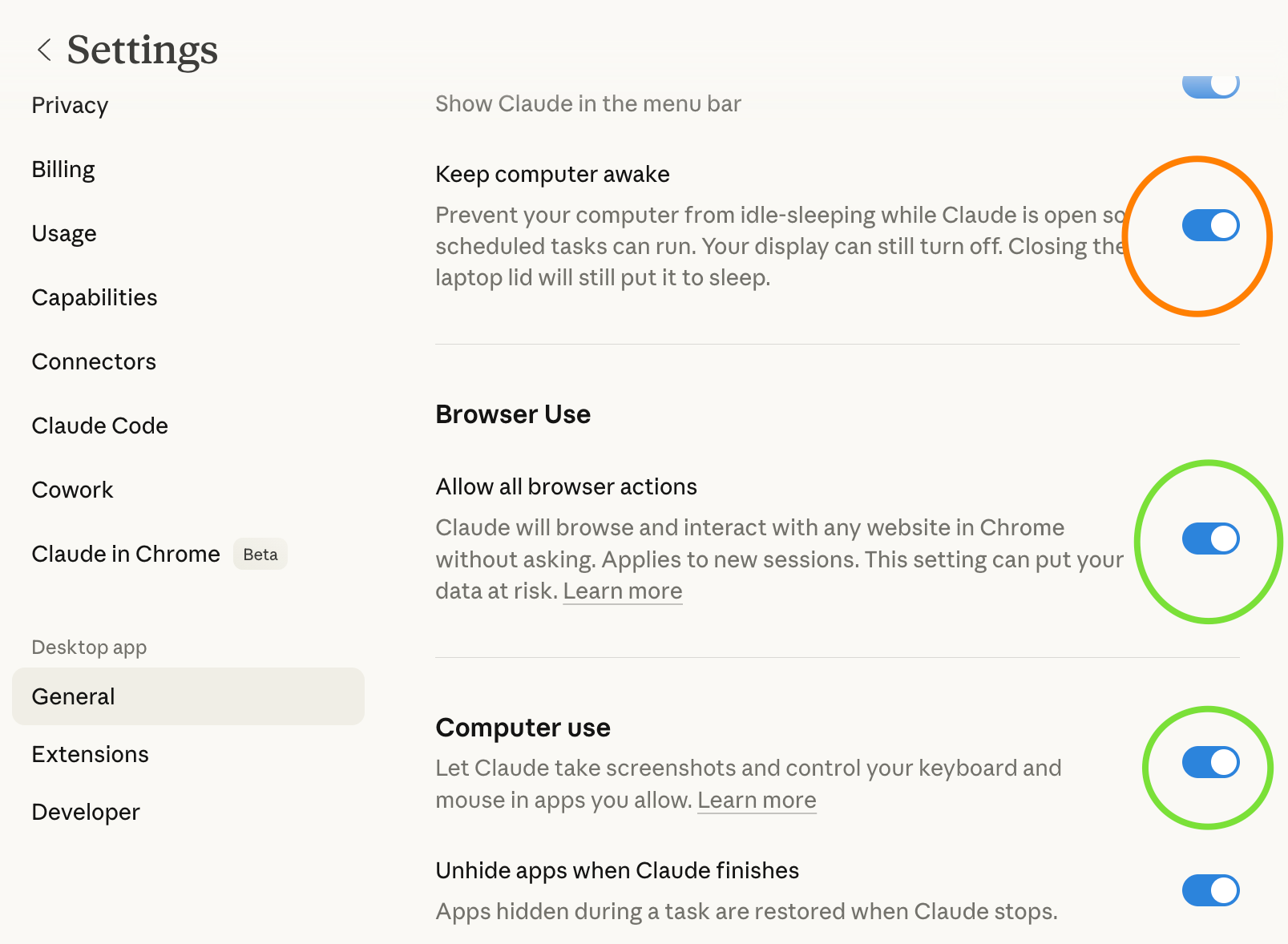
2. The Claude desktop application. Download it from claude.ai. As of early 2026, Cowork mode—the feature that enables browser control and autonomous task execution—is available on macOS. You will want to open Settings and ensure that Computer Use is toggled on under the General tab (green circle). Also make sure to enable Allow all browser actions (green circle). You may also need to enable "Keep computer awake" if your tasks will run while your laptop is closed (orange circle)
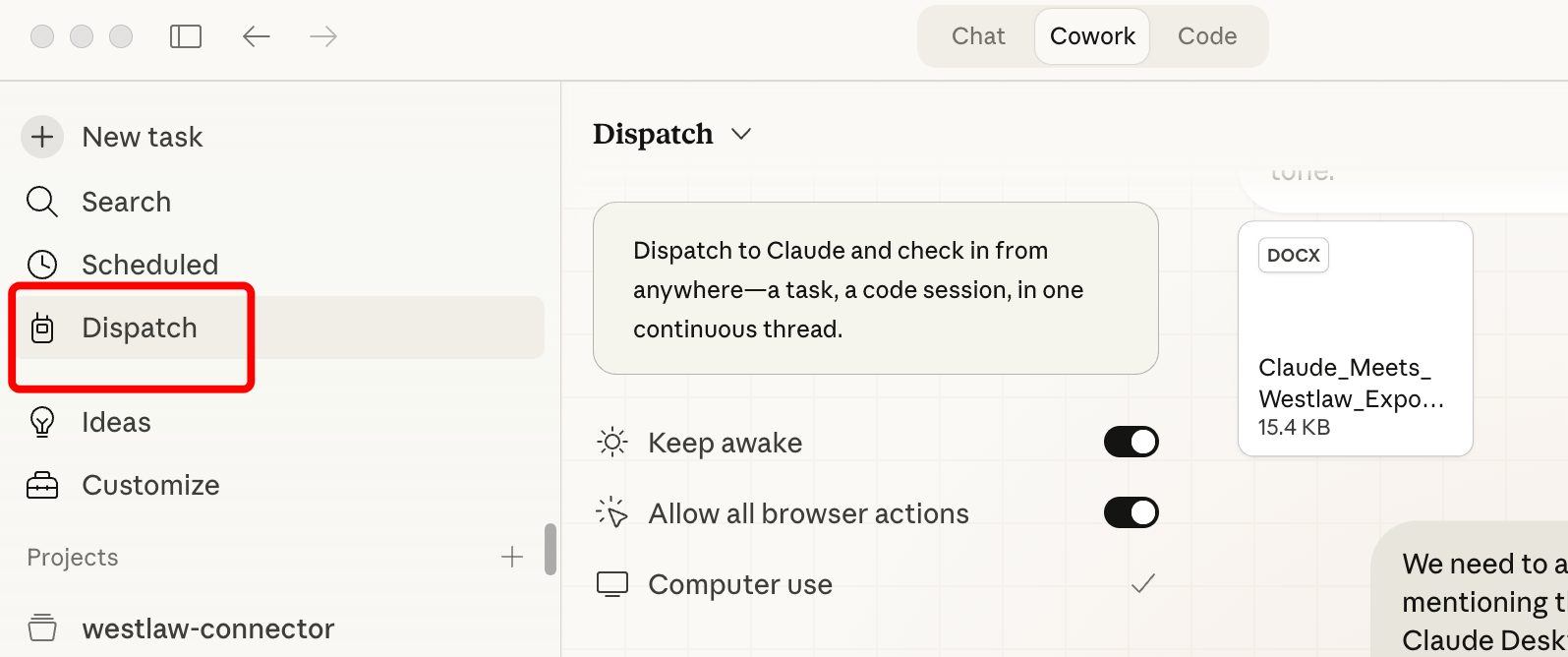
Make sure your Claude desktop app is updated to a version that includes the Dispatch capability — this is the mode that allows Claude to manage long-running tasks, coordinate browser interactions, and deliver files back to you. If you open the Claude desktop app and see a Dispatch or Cowork tab, you have the right version. If not, check for updates. The feature has been rolling out to Pro and Max subscribers since early 2026. You should see something like this. Notice that I am using the Cowork tab, not Chat or code.
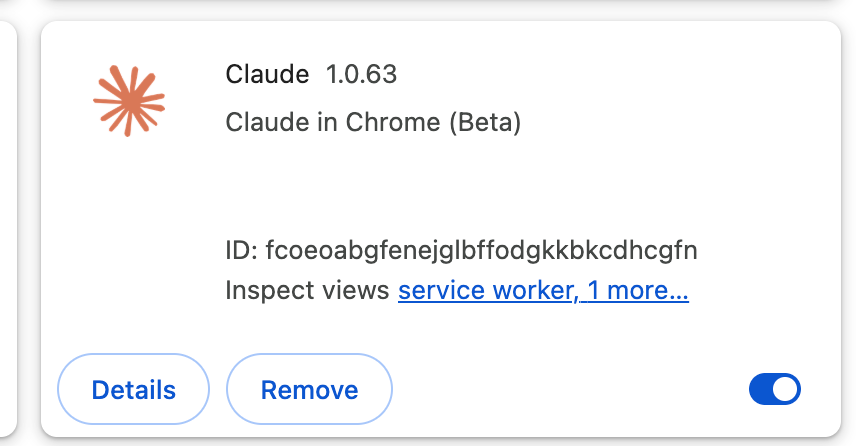
3. The Claude in Chrome extension. This is a free browser extension available in the Chrome Web Store. Install it, sign in with the same Claude account you use in the desktop app, and pin it to your toolbar. Then, in the Claude desktop app, go to Settings → Connectors, find “Claude in Chrome,” and toggle it on. This is the bridge that lets Claude see and interact with whatever is in your browser—including Westlaw and Lexis.
4. A Westlaw or Lexis account. Use whatever credentials your school provides. Log into Westlaw or Lexis in Chrome before you start, or let Claude navigate to the login page. You will need to enter your password yourself—Claude appears to be prohibited from typing passwords for security reasons—but once you are logged in, Claude can take it from there.
5. Approve Westlaw/Lexis as a site Claude can control. When Claude first tries to interact with a website, the Chrome extension will ask you to approve that site. Click approve for Westlaw or Lexis, and Claude gains the ability to click, type, scroll, and read on that site going forward.
- Here's the kind of thing you should see
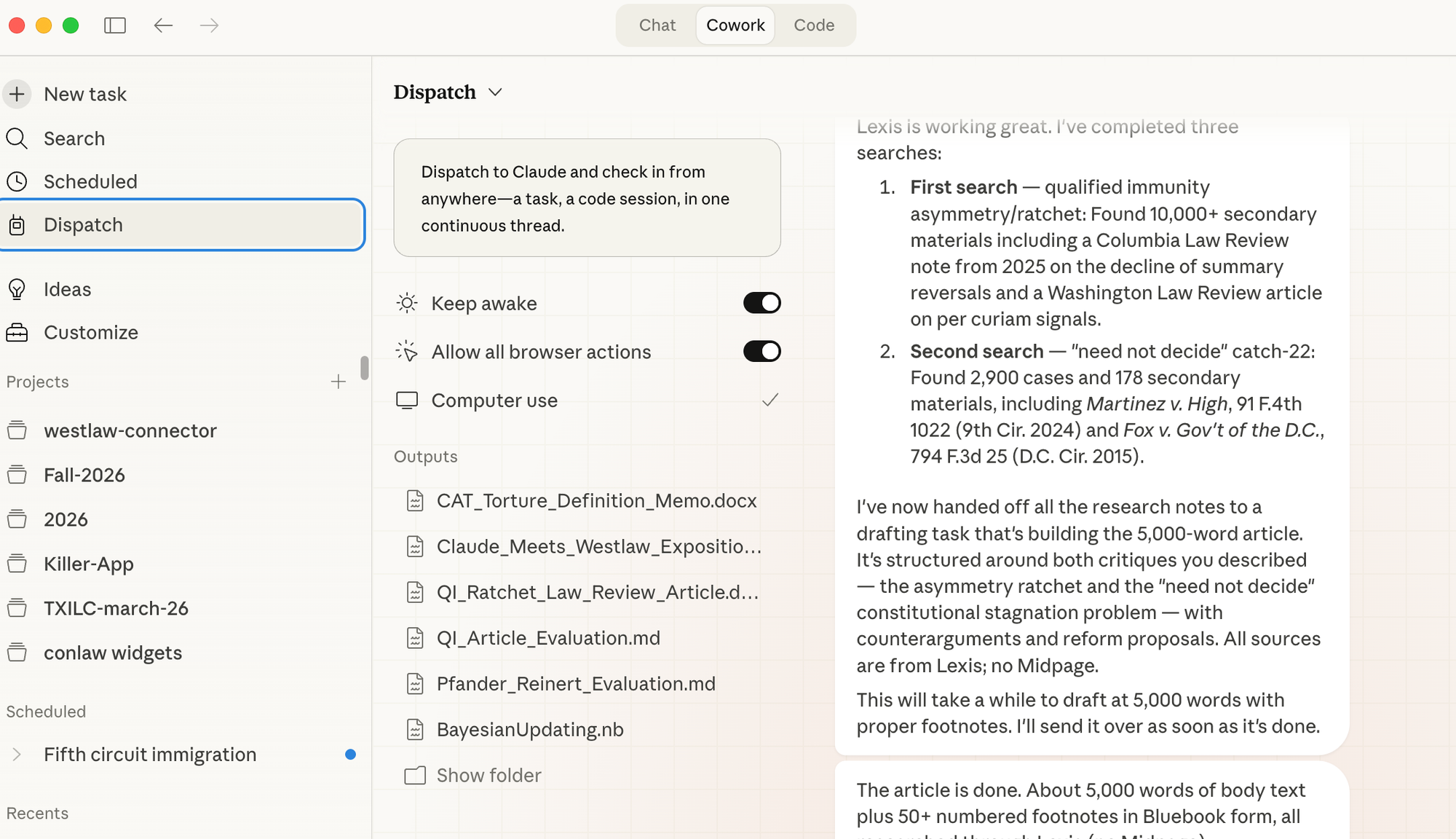
Perhaps it would be useful to see what your computer screen looks like when all of this is working. Here's a sample image. You can see various options and projects in the sidebar, various settings and outputs in the middle, and reports from Claude on the right.
What Claude Can Actually Do on Westlaw and Lexis
Once the connection is established, Claude operates Westlaw or Lexis much the way a research assistant would. It can type search queries using terms and connectors or natural language. It can read the results, click into individual cases or articles, extract key holdings and citations, scroll through secondary source results, and navigate between content types—cases, statutes, law reviews, treatises, ALR annotations, and more. You may or may not see Claude in action. Sometimes it appeared to be actually showing you what it was doing; other times not.
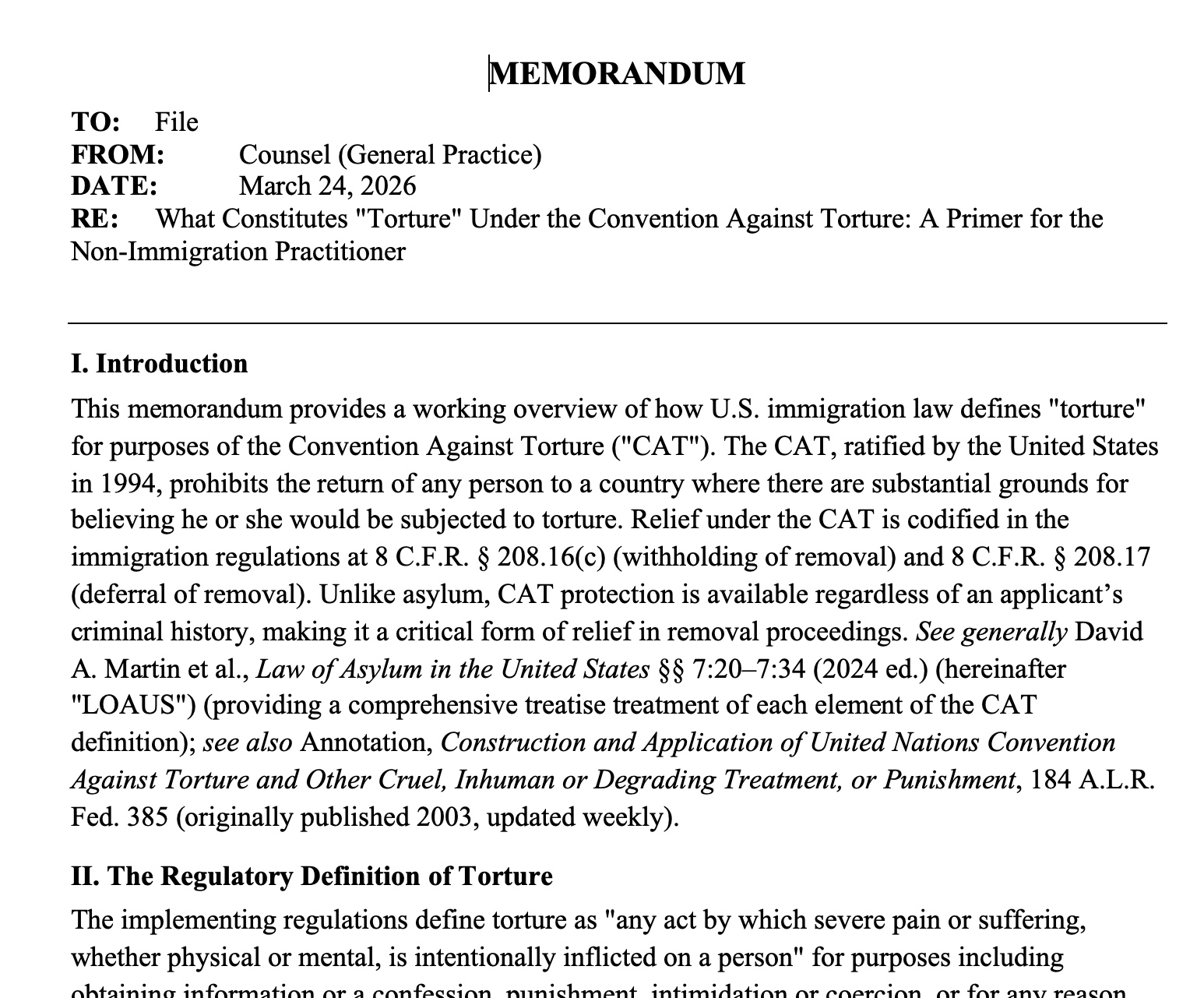
Research on the definition of torture
In one session conducted while developing this document, Claude searched Westlaw for cases on the definition of torture under the Convention Against Torture, found 37 relevant decisions, opened the most relevant ones to read their holdings, then switched to a secondary sources search that returned 444 results—including law review articles, ALR annotations, and sections of the Law of Asylum in the United States treatise. Claude read excerpts from these sources and produced a 1,000-word memorandum with Bluebook citations to both cases and secondary authorities. The entire process took about fifteen minutes.
Produce a 5000-word law review essay on a new Supreme Court decision
In a second session, Claude navigated to Lexis—a separate tab, a separate database, the same workflow. The task was more ambitious: research the qualified immunity “ratchet” problem raised by Justice Sotomayor’s dissent in Zorn v. Linton, 607 U.S. ___ (2026), decided this very week. Claude ran multiple searches on Lexis. The first, targeting secondary materials on qualified immunity asymmetry, returned over 10,000 results. Claude identified a Columbia Law Review student note from 2025 on the decline of summary reversals (125 Colum. L. Rev. 1695) and a Washington Law Review article on per curiam signaling (98 Wash. L. Rev. 427). A second search—for cases using “need not decide” alongside “qualified immunity” and “clearly established”—returned 2,900 cases and 178 secondary sources. Claude then used all of this material to produce a 5,000-word law review article with over thirty Bluebook footnotes, organized around two structural critiques of the qualified immunity doctrine. The article cited cases from the Supreme Court, the Fifth Circuit, the Ninth Circuit, and the D.C. Circuit, as well as law review articles by Joanna Schwartz, William Baude, Aaron Nielson, Christopher Walker, and others—all found through Lexis, not through any AI-native legal database.
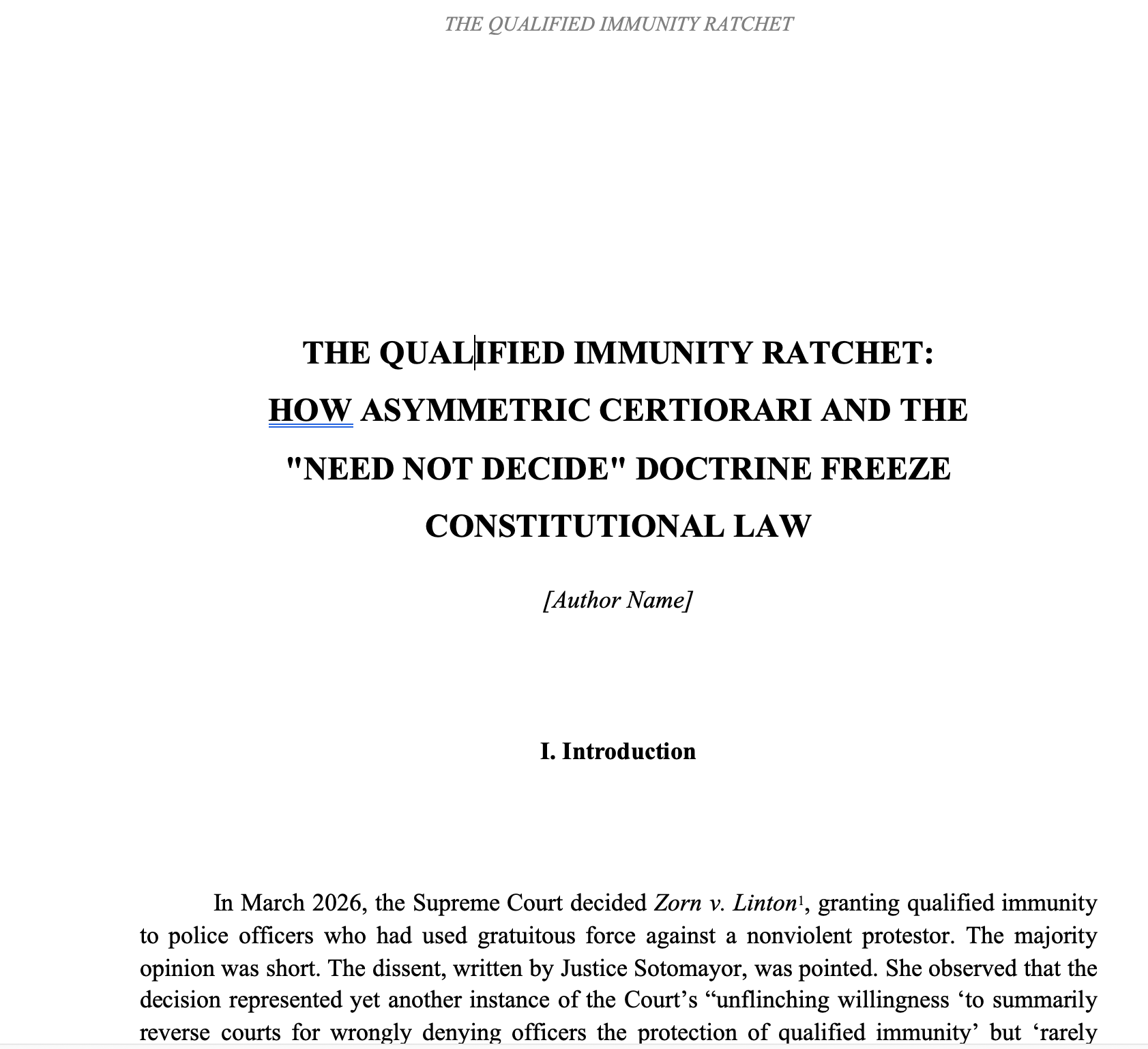
This is the key point: the article that Claude produced was not a summary of what Claude already “knew” from its training data. It was grounded in sources Claude found, read, and cited during the session itself. The Golde note in the Columbia Law Review was published in late 2025, well after Claude’s training cutoff. The Zorn v. Linton decision was handed down days before the session. Claude could not have cited either without access to a current legal database. That is the difference browser-based research makes.
This matters because secondary sources are where Westlaw and Lexis have always dominated. Law review articles, practice guides, treatises, Restatements, legal encyclopedias—these are the bread and butter of legal research, and they are largely unavailable through standalone AI legal tools. The resulting law review article draft is by no means yet publishable and there are many further explorations I would pursue before even considering adding it to the scholarly literature. Moreover, I suspect Claude may not have been as adaptive as I would have been had I been conducting the research myself. But harping on those imperfections is like criticizing the Wright Brothers because their flight was only 120 feet. The point is: it flew!
Evaluate a law review article
I believe that a frontier AI connected to a legal database should be able to act much like a law review editor. To test this proposition, I uploaded a draft of Pfander and Reinert's forthcoming Harvard Law Review essay on Harlow v. Fitzgerald's discretionary function test and asked Claude to evaluate it — using Lexis to verify citations and its own judgment to assess the arguments. Claude assessed all ninety-nine footnotes in the article for both technical accuracy and substantive fairness — checking case names, reporter volumes, starting pages, pin cites, and parenthetical descriptions across two centuries of authority, from Marbury v. Madison to a 2025 Middle District of Florida order. It verified key citations directly on Lexis, confirming reporter data and citing reference counts. It flagged two law review "Online" supplement citations that Lexis does not index, meaning they cannot be Shepardized. And it caught a typographical error in footnote 61: 'Tenney v. Breedlove' should be Tenney v. Brandhove."
But it did more than what back in my day was called a "TechCite." It did a "Subcite" too, i.e. it used a real legal database to identify and assess the quality of the argumentation. You can see why the article placed in Harvard. Claude described it as an original thesis with significant doctrinal payoff, exceptional historical research through integration of cases like Little v. Barreme and Ex Parte Young, pragmatic reform proposal, exhaustive lower court research (in footnotes 81 and 95-97), and clean, accessible prose. But Claude also found weaknesses. It found an underdeveloped treatment of counterarguments, limited engagement with opposing scholarship such as that of Nielson & Walker, no discussion of Pearson v. Callahan, and a thin conclusion.
Claude was also constructive, coming up with seven suggestions including: (1) Develop a detailed framework for distinguishing ministerial from discretionary conduct in modern policing contexts; (2) Engage with the strongest counterargument: that the ministerial-discretionary distinction is too indeterminate to administer and will produce the same kind of hyper-specific, fact- bound litigation that plagues the current "clearly established" standard; and ... (7) Consider engaging with the empirical literature on qualified immunity (particularly Schwartz's work on how often qualified immunity is raised and granted) to bolster the practical stakes of the article's proposal.
The ability shown by this conversation between Claude and Lexis changes the workflow for legal scholarship in ways that should not be understated. A law review article editor who has access to Claude, Lexis, and thirty minutes can now produce a citation audit and substantive critique that rivals what a careful faculty reader would produce over several days. Faculty members can run this on their own drafts before submission and catch problems that would otherwise survive multiple rounds of peer review. The technology is available now, through databases law schools already provide. At some point — and I think that point is now — it becomes almost negligent for a student editor or peer reviewer to skip this step. A tool that can read a nineteen-page article, verify citations against a live legal database, identify a misspelled case name, flag missing counterarguments, and deliver an organized evaluation in under an hour is not a luxury. It is a baseline expectation. And frankly, the evaluation Claude produced here is more rigorous than most "Works in Progress" sessions I have attended, where time constraints and politeness norms often prevent the kind of granular, citation-level scrutiny that an AI reviewer delivers without embarrassment or fatigue.
What Westlaw/Lexis + Claude Can Do That Midpage + Claude Cannot
Does this mean The Killer App I described in prior posts is now superseded? It most definitely does not. The Killer App does not lie in any particular component. It lies in the connectivity structure: a high-quality LLM connected to a high-quality legal database in a way that is simple for the user. Connecting Claude to Midpage AI via MCP is one instance—fast, clean, and backed by a legal database that is often good enough even though it may lack secondary materials (law reviews) beloved by legal academics or international materials that are often important in practice. Connecting Claude to Lexis or Westlaw through AI emulation of human browser use is another. It represents an end run around the resistance of Lexis and Westlaw to making API calls generally available, using a browser as a makeshift vehicle for communication. The payoff is access to the vast repositories that only those legacy platforms can provide. Westlaw includes trial court orders, filed briefs, jury verdict reporters, and pattern jury instructions. These are often important for litigation-focused research and are not available through Midpage. Westlaw’s KeyCite and Lexis’s Shepard’s provide comprehensive citator coverage that goes beyond Midpage’s treatment data. When Claude can see the full KeyCite or Shepard’s report—including negative treatment, distinguishing cases, and citing references organized by depth of discussion—it can make far more reliable judgments about whether a case remains good law. Midpage does an excellent job with algorithmic equivalents to the citation analyses conducted by the legacy platforms but it is not quite yet the same thing.
But let's be clear about what browser emulation actually is: a workaround for an artificial barrier. Forcing an AI to navigate a web interface designed for human eyes is like requiring two computers sitting side by side to communicate by having one display text on a monitor so the other can read it with a camera. The information gets through, but the arrangement is absurd—both machines speak the same digital language natively. When Westlaw and Lexis decline to offer open API access, they are imposing exactly this kind of constraint: forcing a machine to pantomime human behavior instead of simply exchanging data in the format computers already use. It works. But it is slower, more fragile, and more expensive for everyone involved. The question is how long that artificial bottleneck will survive once agentic AI makes the absurdity impossible to ignore. My hope is that Lexis and Westlaw will open up so that accessing their repositories is as clean and easy as accessing Midpage is today.
The Cost Issue
Midpage now charges faculty and law students $25 per month (up from $10 per month just a while back). Westlaw and Lexis are provided free to law school faculty and students through institutional subscriptions. If you are affiliated with a law school, the economic case for using your existing databases is straightforward. If agentic connections via browser emulation to platforms such as Westlaw and Lexis become more widespread and more "consumerized," new entrants may need to rethink their pricing models.
Scenarios: What This Looks Like in Practice
It's worth considering what now can be done better as a result of connecting Claude – and probably other AIs in the future – to the giant legal databases. The following scenarios are adapted from demonstrations originally conducted using Midpage, as described in this blog. Each can now be replicated—and in some cases improved upon—using Westlaw or Lexis through Claude’s browser control.
Just-in-time legal scholarship. This is not hypothetical—we did it. The Supreme Court decided Zorn v. Linton during the week this document was being prepared. Within the same session, Claude navigated Lexis, researched the qualified immunity “ratchet” issue raised in Justice Sotomayor’s dissent, found both cases and law review articles published as recently as 2025, and produced a 5,000-word law review article with Bluebook footnotes engaging Schwartz, Baude, Nielson, Walker, and Jeffries. The entire cycle—from “a major case just dropped” to a draft article with over thirty footnotes—took under an hour. Because Claude had access to Lexis’s secondary sources, the article engaged with existing scholarship, not just judicial opinions. A Midpage-only version could not have done this.
Class preparation with grounded citations. You are teaching constitutional law and want a twenty-slide PowerPoint on the nondelegation doctrine. Claude searches Westlaw for the leading cases, reads the relevant sections of a treatise like Rotunda and Nowak’s Treatise on Constitutional Law, and produces slides with accurate citations and quotations drawn from sources it actually read—not hallucinated from training data.
Research memoranda with secondary authority. Again, this was tested live. A colleague unfamiliar with immigration law needed a memo on what constitutes “torture” under the Convention Against Torture. Claude searched Westlaw, found 37 cases and 444 secondary sources, read key circuit court decisions and multiple sections of the Law of Asylum in the United States treatise, and produced a 1,000-word memo citing both cases and treatise sections in Bluebook form—including an ALR annotation (184 A.L.R. Fed. 385) and a Tulane Law Review article (96 Tul. L. Rev. 1033). No purely case-law tool could have produced the treatise and law review citations that made the memo useful as a practical research starting point.
Bar exam preparation materials. A professor developing NextGen bar exam practice questions can have Claude search Westlaw for recent cases illustrating particular doctrinal points, read the relevant Black Letter Law summaries, and generate constructed-response questions with model answers grounded in cases Claude has actually read on Westlaw—not merely recalled from training.
Student note research. A law review editor working on a note about the circuit split on qualified immunity in excessive force cases asks Claude to search Westlaw for all circuit court opinions from the last three years, identify the split, read the key law review articles discussing it, and produce an annotated bibliography with parenthetical descriptions. Because Claude can access Westlaw’s law review database, the bibliography includes secondary sources that Midpage simply does not have.
Blog Entries. Guess who wrote the first draft of this very blog entry. Hint: not me. The point is that the enormous spectrum of websites, diagrams, prose, and widgets you can now produce with ungrounded AI can now be done far better with the sort of grounding that has now become possible.
A Candid Note on Setup and Rough Edges
I would be misleading you if I suggested this all works seamlessly out of the box. In the sessions that produced the work described in this document, I encountered several friction points that are worth flagging. First, the Chrome extension had silently disabled itself. Claude reported that it could not interact with the browser at all. The fix was straightforward—go to Settings → Connectors in the Claude desktop app, find Claude in Chrome, and toggle it back on—but there was no warning that the extension had disconnected, and it took some troubleshooting to identify the issue. Second, even with the extension enabled, browsers are initially granted only “read” access under Claude’s safety model, meaning Claude can see the screen but cannot click or type. The Chrome extension must be properly connected and the site approved before Claude can interact with it. Third, it appears that Claude cannot enter passwords. This is a slight annoyance, but it might be a good thing given that my bank accounts can be reached via my computer. Fourth, Westlaw and Lexis are complex, JavaScript-heavy web applications, and Claude occasionally loses its place—for instance, after navigating back from a case, Westlaw sometimes redirected Claude to the homepage instead of returning to the search results. Claude recovered by re-running the search, but it added time. Fifth, there is currently a sandboxing limitation that can prevent Claude’s background task sessions from delivering files to the expected output location; I had to regenerate one document directly in the main session after a background task produced it in an inaccessible sandbox.
I suspect, however, that these are early-adoption inconveniences, not fundamental limitations. The underlying capability—an AI that can read and interact with full-featured legal databases—is genuine and improving rapidly. Anthropic updates the Chrome extension and Cowork mode regularly, and each iteration reduces the friction. If you try this in March 2026 and find it clunky, try again in June.
The Bigger Picture
What we are witnessing is the collapse of the distinction between “AI tools” and “legal research tools.” They are merging. Claude is no longer limited to what it memorized during training or what a single API can provide. It can use the same databases that lawyers and scholars have relied on for decades—with the same depth of coverage, the same editorial enhancements, and the same citator tools—but at a pace and scale that no human researcher can match.
Moreover, focusing on Claude is a mistake. My inspiration for this blog post was a former student who yesterday contacted me excitedly to let me know that in her mostly transactional legal practice she was now finding great success connecting Manus – an agentic AI recently purchased for $2 billion by Meta – to Lexis. When today she showed me the process in action – and let me know that she was willing to pay $200 per month for the privilege – I just put two and two together and speculated that Claude with its new "Dispatch" facility might now be able to do the same thing. For less money! And what Claude can do today, I am sure that Gemini and ChatGPT will be able to do shortly. While browser emulation is not quite commodity technology yet, by the end of 2026 it is likely to be so. The argument for AI-controlled legal research and drafting is overwhelming.
The trajectory is clear. Law faculty who learn to direct these tools effectively will produce scholarship faster, prepare richer classes, and model for their students the kind of AI-augmented legal practice that is rapidly becoming the norm. Students who master this workflow during law school will enter practice with a genuine competitive advantage. The Killer App is becoming ever more powerful.
Notes
- Claude is not doing a great job of explaining its new Dispatch facility. It seems to be marketed as some sort of remote presence capability where you can talk to Claude via your phone or through apps such as Telegram. This may be true but it misses the point. The bigger point is that Dispatch gives Claude the power to "be you," to do everything that you could do on your own computer. And, yes, you can provide the triggering prompts on your phone, but you certainly don't need to. Everything I did in preparing this blog entry was done on my regular laptop.
- You need to be extremely careful when giving Claude Cowork access in Dispatch mode to your computer. Although there are likely some safeguards in place, with access to your computer, Claude can do very destructive things that may not be easily reversible. It is not just operating in a "sandbox" anymore. Indeed, I got sufficiently nervous about some work Claude Cowork/Dispatch was doing using Wolfram Mathematica that I pressed the stop button. Everything probably would have been fine, but the downside risk was greater than I was willing to tolerate. Some people use agentic AI such as has been described here only on a computer solely intended for that purpose and that does not have access to their "human" work. Thus the wild demand for Mac Minis, which are an excellent hardware platform on which to run agentic AI.